
Audio Signal Generator
Build a practical audio-frequency signal source for testing amplifiers, preamplifiers, speakers, filters, tone controls and other audio circuits.
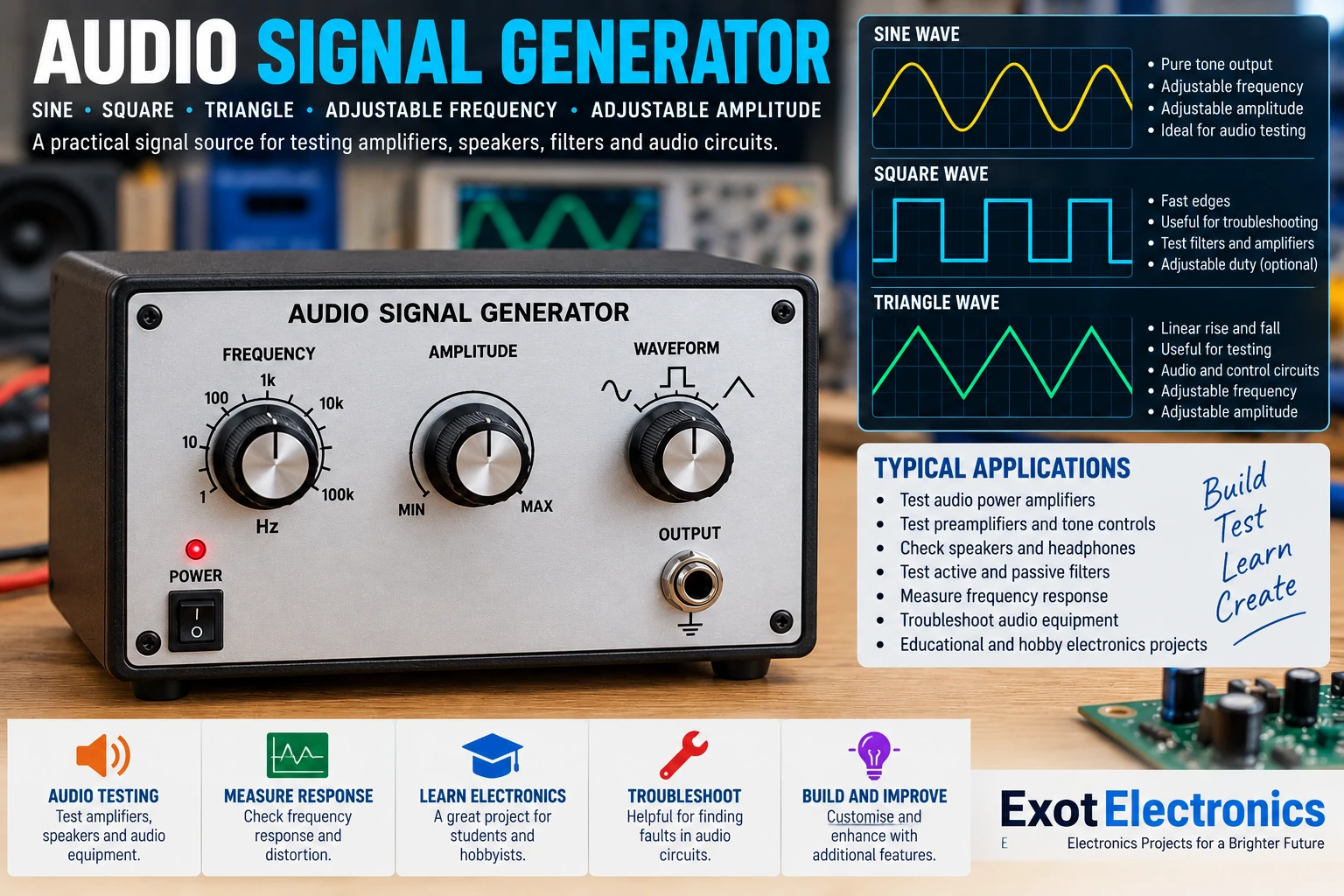
What Is an Audio Signal Generator?
An audio signal generator produces a controlled electrical signal over the audio-frequency range. Instead of using music as a test source, a generator provides a predictable signal that makes it much easier to test and troubleshoot audio circuits.
A simple generator can provide a sine-wave output with adjustable frequency and amplitude. More advanced versions can provide additional waveforms and frequency ranges.
Why Build One?
A signal generator is one of the most useful tools on an electronics bench. A known test signal allows you to follow an audio signal through each stage of a circuit and determine where a problem occurs.
- Test audio power amplifiers.
- Test preamplifiers and microphone circuits.
- Check tone-control circuits.
- Test active and passive filters.
- Measure amplifier frequency response.
- Investigate clipping and distortion.
- Trace audio signals through equipment.
Basic Signal Path
The generator can be divided into several functional stages:
The oscillator creates the signal, the frequency control determines its frequency, and the amplitude control sets the output level. The output buffer isolates the oscillator from the circuit being tested.
Oscillator
The oscillator is the heart of the generator. An op-amp oscillator, dedicated function-generator IC or digital waveform generator can be used depending on the desired design.
A sine wave is particularly useful for audio amplifier testing because it provides a simple, repeatable test signal.
Frequency Control
The frequency control allows the operator to select the required test frequency. In a simple analog design this can be implemented with a potentiometer and timing components.
| Application | Example Frequency |
|---|---|
| Sub-bass testing | 20–50 Hz |
| Bass testing | 50–250 Hz |
| Midrange testing | 250 Hz–2 kHz |
| Treble testing | 2–10 kHz |
| High-frequency audio testing | 10–20 kHz |
Amplitude Control
The output amplitude should be adjustable because different circuits require different input levels. A sensitive preamplifier may require only a small signal, while an amplifier test can require a substantially larger signal.
A potentiometer can provide simple output attenuation. Always start with the output level at minimum when connecting the generator to an unknown circuit.
Output Buffer
The output buffer prevents the circuit being tested from heavily loading the oscillator. An op-amp voltage follower or suitable buffer stage can provide a low-impedance output.
The buffer should remain stable with the expected cable capacitance and load. Good power-supply decoupling is also important.
Waveform Options
Although a sine wave is ideal for many audio measurements, additional waveforms can make the generator more versatile.
- Sine wave: amplifier and frequency-response testing.
- Square wave: transient and switching experiments.
- Triangle wave: waveform and filter experiments.
- Sweep: examining circuit response across frequencies.
Testing an Audio Amplifier
Connect the generator to the amplifier input and use an oscilloscope to observe the amplifier output.
- Set the generator to approximately 1 kHz.
- Set the output amplitude to a low level.
- Connect the generator to the amplifier input.
- Connect the oscilloscope to the amplifier output.
- Increase the generator level gradually.
- Observe the waveform for clipping or distortion.
Frequency Response Testing
The generator can be used to measure how an amplifier, filter or preamplifier responds to different frequencies.
Keep the generator output level constant while changing the frequency. Measure the output level at each frequency and record the results. This provides a simple frequency-response curve.
Testing Filters
Apply the generator signal to the filter input and observe the output while changing frequency.
- Low-pass filters
- High-pass filters
- Band-pass filters
- Notch filters
- Active audio filters
- Tone-control circuits
Oscilloscope Verification
An oscilloscope is extremely useful when building the generator. Check the waveform at the oscillator output and again after the output buffer.
- Verify waveform shape.
- Measure frequency.
- Measure output amplitude.
- Check for unwanted oscillation.
- Check waveform stability under load.
Power Supply
The power supply should be suitable for the selected oscillator and amplifier stages. A regulated supply is preferable because supply-voltage variations can affect oscillator stability and output level.
Place supply bypass capacitors close to the IC power pins and keep the analog supply wiring short and clean.
Typical Parts
| Part | Function |
|---|---|
| Oscillator | Generates the audio waveform |
| Frequency potentiometer | Adjusts frequency |
| Amplitude potentiometer | Adjusts output level |
| Op-amp/buffer | Provides a low-impedance output |
| Output connector | Connects to the circuit under test |
| Regulated supply | Powers the electronics |
| Decoupling capacitors | Reduces supply noise and instability |
Construction Tips
- Keep oscillator wiring short.
- Place bypass capacitors close to IC power pins.
- Keep digital circuitry away from sensitive analog circuitry.
- Use shielded output cable where practical.
- Use a clean common ground for the generator and test equipment.
- Use a metal or screened enclosure if hum becomes a problem.
Troubleshooting
No output
Check the power supply, oscillator connections, IC orientation, frequency control, amplitude control and output connector. Check the oscillator output directly with an oscilloscope.
Frequency is unstable
Check timing components, supply stability, component values and oscillator loading. A buffer stage can prevent the load from disturbing the oscillator.
Distorted waveform
Reduce the output level and check whether the oscillator or buffer is being driven outside its linear operating range. Also check the supply voltage.
Hum or noise
Check grounding and cable routing. Keep signal wiring away from mains wiring and noisy power supplies. Shielding may be required in a sensitive setup.
Practical Applications
Once completed, this generator becomes a useful piece of bench equipment. It can be used together with an oscilloscope and multimeter for amplifier repair, circuit development, educational experiments and audio troubleshooting.
Safety
The generator itself is normally a low-voltage device, but the equipment being tested may contain hazardous voltages.
Never connect test equipment directly to a mains-referenced circuit unless the measurement arrangement is specifically designed and rated for that purpose. When testing power amplifiers, use suitable dummy loads and respect the voltage and power ratings of all connected equipment.