
Function Generator
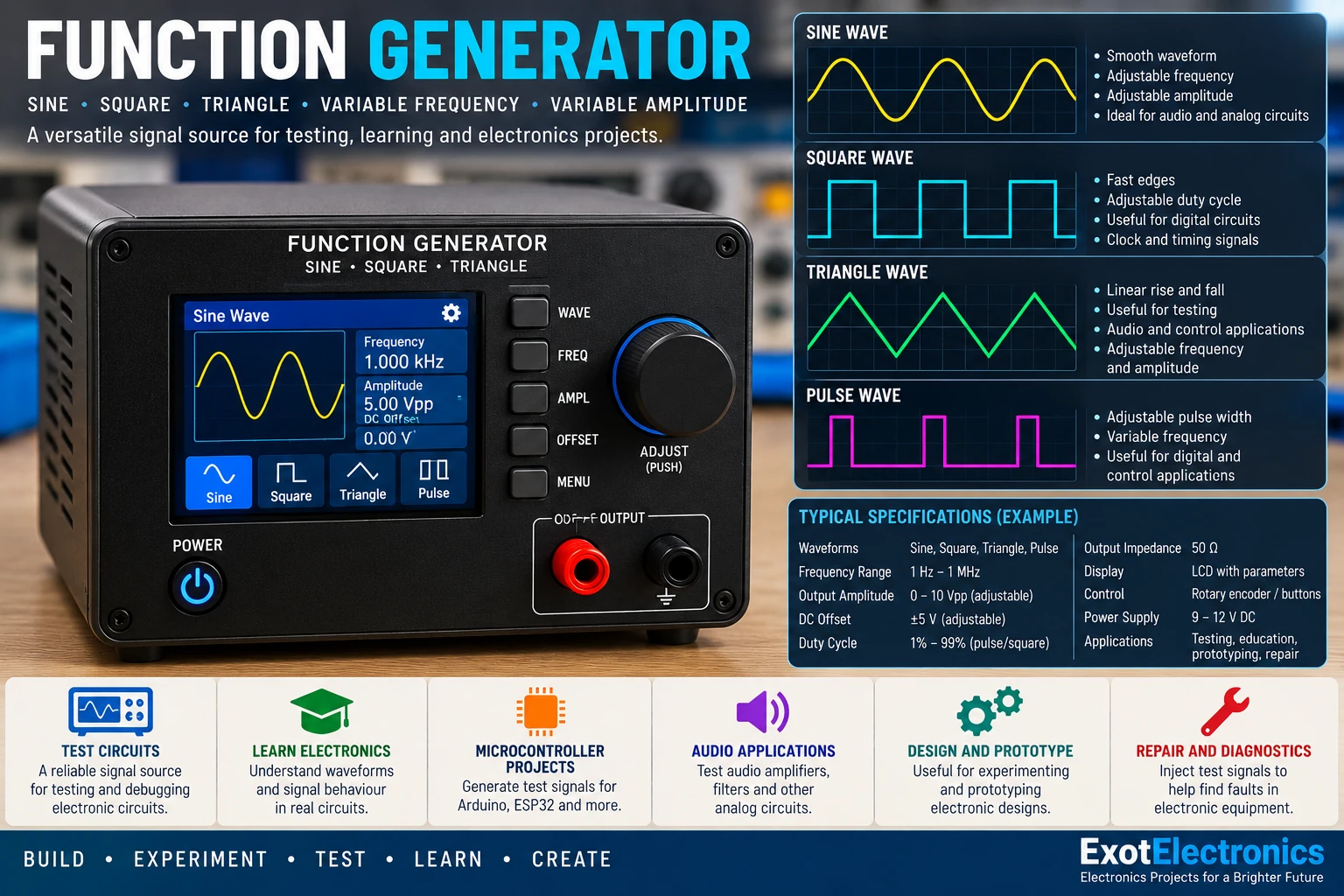
A practical laboratory signal source for generating sine, triangle and square waves. Use it for testing amplifiers, filters, audio circuits, oscillators and other electronic projects.
What Is a Function Generator?
A function generator is an electronic test instrument that produces controlled electrical waveforms. Instead of using a fixed-frequency signal from an audio source, you can select the waveform, adjust its frequency and control the output level as required by the circuit under test.
A simple DIY function generator is particularly useful on an electronics workbench because it can provide repeatable test signals without requiring a complete laboratory instrument.
Waveforms
The generator can be designed around three common waveforms:
- Sine wave: useful for audio testing, amplifier measurements and filter testing.
- Triangle wave: useful for waveform experiments, comparator circuits and timing applications.
- Square wave: useful for digital circuits, clock testing, switching circuits and logic experiments.
The square wave is normally taken directly from the oscillator or comparator stage, while the triangle and sine outputs are shaped from the oscillator waveform.
Basic Block Diagram
Frequency control → Oscillator → Waveform shaping → Output buffer → Level control → Output
The oscillator establishes the fundamental frequency. Additional circuitry converts the oscillator signal into the required waveform and a buffer isolates the generator from the load connected to its output.
Oscillator Section
One practical approach is to use a dedicated function-generator IC such as the XR2206/compatible device. Such an IC integrates the main oscillator and waveform-generation functions, greatly reducing the amount of external circuitry required for a bench experiment.
The timing resistor and capacitor determine the operating frequency. A switched range capacitor can be combined with a potentiometer to provide several frequency ranges while retaining convenient adjustment.
Frequency Control
A useful front-panel arrangement is to provide several frequency ranges and a fine-adjustment control. For example, the range switch can select a suitable timing capacitor while the frequency potentiometer provides continuous adjustment within that range.
The exact frequency limits depend on the oscillator IC, timing components and circuit configuration. Keep the timing components reasonably stable and use a good-quality potentiometer for repeatable control.
Output Level Control
The waveform output should pass through a buffer before reaching the front-panel level control. The buffer prevents the external load from significantly changing the oscillator conditions.
A potentiometer can then be used as an amplitude control. For circuits that require a predictable test voltage, an attenuator with known resistor values is preferable to relying only on a panel marking.
Output Buffer
An op-amp voltage follower or suitable transistor/buffer stage can be used to provide a low-impedance output. The buffer is especially important when the generator is connected to filters, amplifier inputs, measuring instruments or other circuits whose input impedance may vary.
Add supply decoupling close to the active device. Keep the oscillator and sensitive waveform-shaping nodes away from the output wiring to reduce unwanted feedback and oscillation.
Suggested Parts
| Part | Typical choice | Purpose |
|---|---|---|
| Function-generator IC | XR2206 or compatible device | Oscillator and waveform generation |
| Frequency potentiometer | 10 kΩ–100 kΩ | Frequency adjustment |
| Range capacitors | Several values | Frequency-range selection |
| Buffer op-amp | TL072, NE5532 or suitable device | Output isolation and buffering |
| Level potentiometer | 10 kΩ–50 kΩ | Output amplitude control |
| Decoupling capacitors | 100 nF + electrolytic | Supply bypassing |
| Output connector | BNC or 3.5 mm jack | Connection to test equipment |
Building the Circuit
- Build the oscillator section first and verify that the frequency changes correctly with the control.
- Check the waveform at the oscillator output with an oscilloscope.
- Add the waveform-shaping section and verify the sine, triangle and square outputs separately.
- Add the output buffer and confirm that connecting a normal test load does not significantly change the waveform.
- Install the amplitude control and output connector after the signal path is working correctly.
- Use short wiring around the oscillator and keep the timing network away from noisy power wiring.
Testing With an Oscilloscope
An oscilloscope is the best instrument for checking a function generator during construction. Start with a low frequency and observe the waveform while slowly adjusting the frequency control.
Check the following:
- Frequency changes smoothly.
- The selected waveform is clean and stable.
- The output amplitude follows the level control.
- There is no unexpected DC offset when the output should be AC-coupled.
- The waveform remains stable when a load is connected.
Frequency Measurement
If the oscilloscope provides an automatic frequency measurement, compare its reading with the expected frequency. Otherwise, measure the period of one complete cycle and calculate frequency using:
Here f is frequency in hertz and T is the period in seconds.
Improving Frequency Accuracy
The frequency accuracy of a simple generator depends on the oscillator architecture and the stability of its timing components. For better repeatability, use stable capacitors, precision resistors and a good potentiometer. A frequency counter can be connected to the output during calibration.
If a calibrated frequency readout is required, a microcontroller can measure the generated waveform and display its frequency without changing the basic analog signal-generation section.
Common Problems
No Output
Check the supply voltage, IC orientation, oscillator timing components and output connection. Verify the oscillator signal before troubleshooting the buffer stage.
Frequency Does Not Change
Check the frequency potentiometer and range switch wiring. A wrong or open timing capacitor can also leave the oscillator outside its intended operating range.
Distorted Sine Wave
Excessive output level, incorrect waveform-shaping adjustment, supply problems or loading can introduce distortion. Reduce the amplitude and check the waveform before the output buffer.
Unstable Waveform
Improve supply decoupling, shorten oscillator wiring and keep the output stage physically separated from sensitive timing nodes. A poorly laid-out breadboard can also introduce unwanted coupling.
Using the Generator for Audio Testing
A function generator is particularly useful when repairing or designing audio equipment. A 1 kHz sine wave is a convenient reference signal for checking preamplifiers, tone-control circuits and power amplifiers.
For amplifier testing, increase the generator output gradually while observing the amplifier output on an oscilloscope and using an appropriate dummy load. Do not connect an oscilloscope ground clip to a point that is not electrically safe for the instrument.
Practical Front Panel
A useful enclosure can include:
- Frequency range selector
- Frequency adjustment potentiometer
- Waveform selector
- Output-level control
- Output connector
- Power indicator
- Optional frequency display
Label the frequency ranges clearly and leave enough separation between controls to make the instrument easy to operate while probing a circuit.
Safety
The generator itself should normally operate from a safe low-voltage supply. When using it to test mains powered equipment, however, the generator may become connected to hazardous circuitry through the test leads. Use appropriate isolation and measurement equipment and never connect grounded test equipment to a live mains circuit unless the measurement setup is specifically designed for it.