
Logic Analyzer
A practical digital measurement tool for capturing and examining logic signals, timing relationships, communication buses and digital circuits.
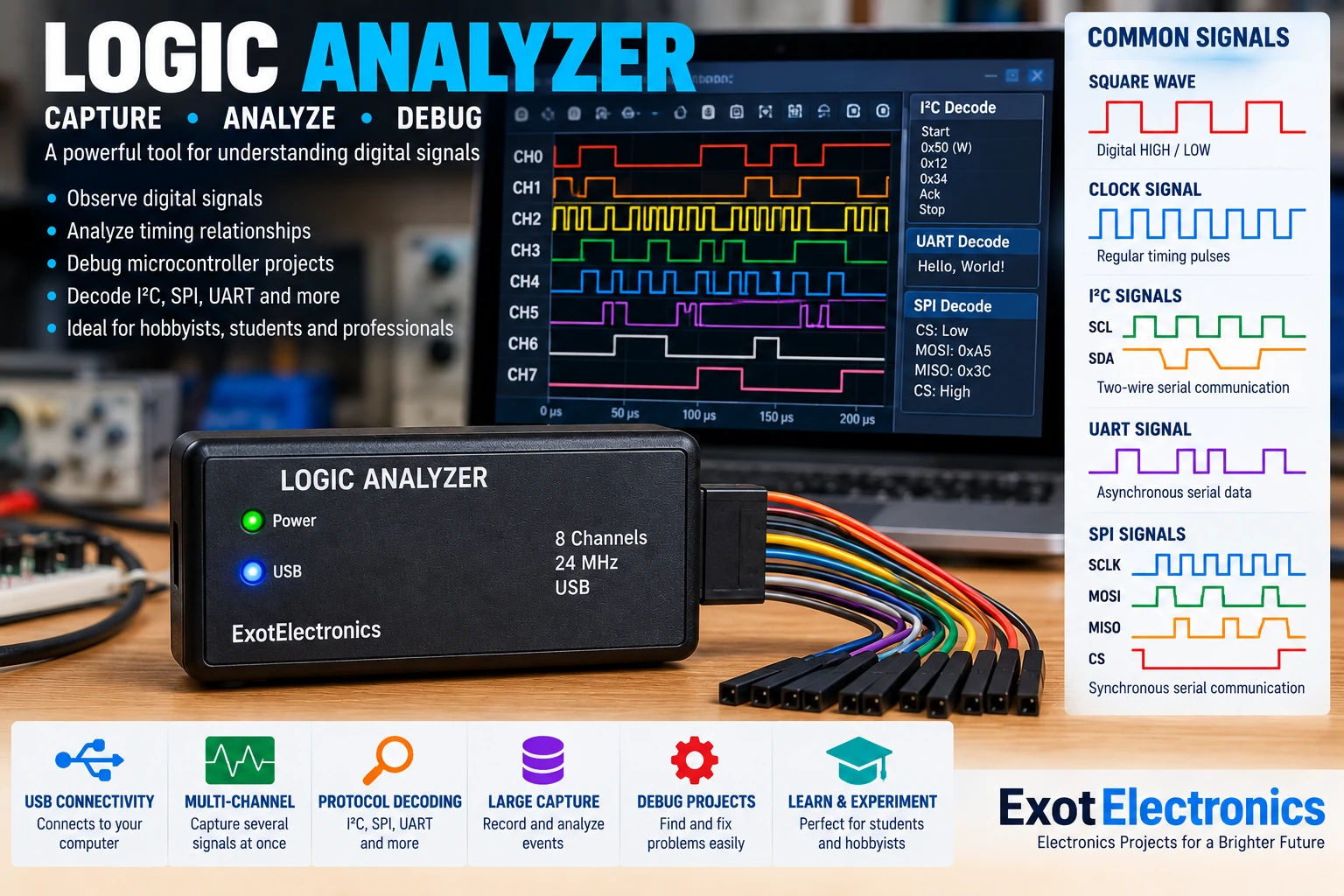
What Is a Logic Analyzer?
A logic analyzer is a digital test instrument used to capture electrical signals and display them as logic states over time. Unlike an oscilloscope, which primarily shows the actual voltage waveform, a logic analyzer is optimized for determining whether a signal is logic HIGH or LOW and for examining the timing relationship between several digital signals.
This makes it particularly useful when working with microcontrollers, digital interfaces, counters, timers, communication buses and embedded systems.
Why Build One?
A simple logic analyzer can be extremely useful on an electronics workbench. It allows digital signals to be captured and examined after an event has occurred rather than requiring the operator to observe every signal in real time.
- Debug microcontroller projects.
- Observe digital timing signals.
- Analyze serial communication.
- Investigate SPI, I²C and UART signals.
- Check clock and data relationships.
- Find missing or incorrectly timed pulses.
- Verify digital control circuits.
Basic Architecture
A basic logic analyzer consists of input protection, digital input channels, a sampling system, memory and a controller that transfers the captured data to a computer or display.
Digital Inputs
Each input channel monitors one digital signal. The input circuitry must be compatible with the voltage levels being measured and should provide suitable protection against accidental overvoltage.
Depending on the design, inputs may be intended for 5 V TTL signals, 3.3 V logic or other specified voltage ranges. Never assume that an input is safe for an arbitrary voltage.
Sampling
The analyzer periodically samples each input and stores the resulting logic states. The sampling rate determines how accurately short pulses and timing events can be captured.
For reliable measurements, the sampling rate must be sufficiently high for the fastest signal or timing event that needs to be observed.
Number of Channels
More channels allow more signals to be observed at the same time. Even a small analyzer can be useful for simple projects.
| Channels | Typical Use |
|---|---|
| 2–4 | Simple digital circuits and timing checks |
| 8 | Serial buses and microcontroller debugging |
| 16+ | Complex buses and larger digital systems |
Triggering
A trigger determines when the analyzer begins capturing or displaying data. Without triggering, finding an important event inside a continuous stream of digital activity can be difficult.
A simple trigger can start when one input changes state. More advanced analyzers can trigger on combinations of signals, specific patterns or communication events.
Pre-Trigger Capture
A useful analyzer can reserve part of its memory for samples collected before the trigger event. This allows you to see what happened immediately before the fault or communication event.
Pre-trigger capture is particularly useful when troubleshooting intermittent digital problems.
Analyzing UART Signals
UART is one of the simplest interfaces to investigate with a logic analyzer. Connect the analyzer to the transmit and receive signals and capture the communication.
With the appropriate protocol decoder, the captured bits can be interpreted as bytes and displayed as readable data.
- Check whether data is being transmitted.
- Verify baud-rate timing.
- Identify incorrect bytes.
- Check start and stop bits.
- Investigate communication failures.
Analyzing I²C
I²C uses two main signals: SDA for data and SCL for the clock. A logic analyzer with at least two suitable channels can capture both signals and reveal the complete transaction.
This is particularly useful when a microcontroller fails to communicate with a sensor, EEPROM, display or other I²C peripheral.
Analyzing SPI
SPI normally uses a clock, data and chip-select signals. Depending on the configuration, separate data lines may be used for transmit and receive.
Capturing these signals simultaneously makes it possible to determine whether the correct clock, chip-select and data sequence is being generated.
Memory
Captured samples must be stored before they are transferred to the computer or displayed. Memory size therefore affects how long a recording can be made at a given sampling rate.
Higher sampling rates consume memory more quickly. A practical analyzer may therefore use a trigger system to capture only the section of the signal that is important.
USB Interface
A USB connection can provide both communication with a computer and, in some designs, power for the analyzer.
The controller transfers captured samples to software running on the computer, where the signals can be displayed and decoded.
Software
The computer software should display each channel against a common time axis. This makes it possible to examine the timing relationship between signals.
Useful software features include zooming, cursors, measurements, triggering, protocol decoding, data export and search.
Typical Components
| Part | Purpose |
|---|---|
| Digital input stage | Receives and conditions external logic signals |
| Input protection | Helps protect the analyzer from accidental overvoltage |
| Logic sampler | Converts signal states into captured digital samples |
| RAM | Stores captured samples |
| Microcontroller or FPGA | Controls sampling and data transfer |
| USB interface | Transfers captured data to a computer |
| Test leads | Connect the analyzer to the circuit |
Input Protection
Protection is important because a logic analyzer is often connected to unknown circuits during troubleshooting.
Depending on the design, protection may include series resistors, clamps, limiting components or dedicated input protection circuitry.
Protection should never be considered a substitute for checking the voltage of the circuit before connecting the analyzer.
Logic Thresholds
A digital input determines whether the incoming voltage represents a LOW or HIGH state according to its input thresholds.
The threshold must be compatible with the logic family being measured. Problems can occur when a signal has an insufficient voltage level or has slow or noisy transitions.
Logic Analyzer vs Oscilloscope
| Logic Analyzer | Oscilloscope |
|---|---|
| Excellent for many digital channels | Excellent for analog waveform detail |
| Shows logic states and timing | Shows actual voltage waveform |
| Excellent for digital protocols | Excellent for noise and signal integrity |
| Large digital captures are practical | Best for detailed waveform analysis |
The two instruments complement each other. A logic analyzer can show what digital events occurred, while an oscilloscope can show the electrical waveform responsible for those events.
Testing a Microcontroller
Connect analyzer channels to important signals such as clocks, UART lines, SPI signals, I²C lines, chip-select outputs or GPIO pins.
- Connect the analyzer ground to the circuit ground.
- Connect the required digital channels.
- Configure the appropriate input voltage range.
- Select a suitable sampling rate.
- Configure the trigger.
- Start the capture.
- Examine the timing and decoded data.
Troubleshooting
No signal appears
Check the ground connection, probe connection, selected channel and input voltage compatibility. Confirm that the circuit is actually generating the expected signal.
Signal appears intermittent
Increase the capture length and configure a useful trigger. Check the wiring and look for a signal that occurs only under particular operating conditions.
Incorrect protocol decoding
Verify the protocol settings, clock frequency, bit order, polarity and sampling rate. A decoder cannot compensate for incorrectly captured data.
Random digital glitches
Check signal integrity with an oscilloscope. Long probe wires, poor grounding, ringing, noise and slow transitions can produce unexpected logic transitions.
Construction Tips
- Keep high-speed signal paths short.
- Use good ground connections.
- Place decoupling capacitors close to digital ICs.
- Separate noisy power circuitry from sensitive inputs.
- Use suitable connectors for the test leads.
- Clearly label each input channel.
Practical Applications
- Microcontroller debugging
- Arduino and ESP32 projects
- UART troubleshooting
- I²C sensor debugging
- SPI peripheral testing
- Digital clock measurement
- Counter and timer circuits
- Embedded-system troubleshooting
- Learning digital electronics
Safety
Only connect the analyzer to signals within its specified input-voltage range. Never connect a low-voltage logic analyzer directly to mains voltage or another hazardous circuit.
The analyzer ground may be connected to the computer's ground through USB. Always understand the grounding arrangement before connecting it to equipment that may have a different ground potential.